A 5-minute walkthrough for tracking a content-generation pipeline (RSS → AI → image → publish) end-to-end. We use a pipeline that drafts a long-form blog post (≈ 90 min of human work replaced by ≈ 30 seconds of agent work) as the example, but the same shape applies to any multi-step content automation: video scripts, podcast show notes, social posts, internal newsletters.
Before you start
- An API key from
/api-keys - A pipeline that already produces drafts (n8n + OpenAI / Claude is the common shape; Make.com works the same way)
- A rough sense of how long a writer would have spent on the same draft (we use 90 min for a 1,500-word blog post; tune to your case)
Step 1 · Pick the right task type
For a long-form draft, use the built-in blog_long_draft task type (90-minute baseline). If your blog is shorter, faster, or much longer, create a custom task type on /task-types:
| Type | Baseline | When to pick |
|---|---|---|
blog_long_draft |
90 min | 1500+ words, includes outline + first draft |
blog_short_draft |
35 min | 500-800 words, social-first |
Custom (e.g. blog_bilingual_draft) |
Yours | Bilingual, technical, or other variants |
Override the baseline on a per-workspace basis if your team's actual time differs from the default. We baked the 90-minute number from HubSpot's 2024 content-team study; your in-house creator may be faster or slower.
Step 2 · Wire the track call at the end of the pipeline
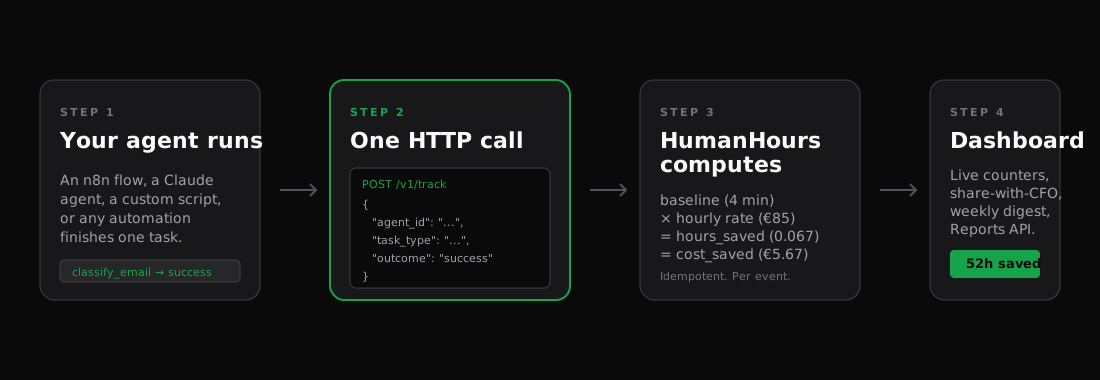
Drop the HumanHours node (n8n) at the very end of the pipeline, after the publish/save step. Map the fields:
agent_id:    bilingual-blog-agent          # or your slug
task_type:   blog_long_draft
outcome:     success
metadata:    {
  article_id:   {{ $json.article_id }},
  title:        {{ $json.title }},
  source:       "rss",
  source_url:   {{ $json.source_url }}
}
The metadata fields are optional, but they show up on the agent-detail page and let you cross-reference back to your CMS later.
Step 3 · Send agent_duration_seconds (optional)
If you want the dashboard to also show how fast the agent itself is (not just the human time it replaced), add agent_duration_seconds. It is the wall-clock seconds of the agent run, from "start" to "publish".
For an n8n flow that triggers and finishes in < 60 seconds, the value is tiny (e.g. 28). The dashboard then shows both:
- Human equivalent: 1h 30m
- Actual agent runtime: 28s
- Net saved: 1h 29m 32s
This is what makes the ROI conversation crisp. The CFO question "what does this AI thing cost in time" gets answered with two numbers next to each other.
Step 4 · Backfill historical drafts (optional)
If your pipeline has been running for weeks before you wired up HumanHours, contact support@triadagency.ai to backfill so the dashboard shows the full history. Provide a list of (article_id, date, title) and we will line them up against your active agent within an hour.
What good numbers look like
For a content pipeline that publishes a few articles per week with a 195-minute baseline override and a €47.50 hourly rate:
TIME SAVED 30D     COST SAVED 30D     EVENTS
19h 30m            €926.25            6
Six articles in 30 days × 195-min override × €47.50/h = €926. If your hourly rate or baseline is different, the math scales linearly.
Going further
- Multiple content types: split into
blog_long_draft,linkedin_short_post,email_newsletter— each a separate task type, all attributed to the same agent_id, breaks down nicely on/reports/time-saved. - Outcome tracking: use
successfor published articles,needs_reviewfor ones that got bounced back to the editor,failurefor runs that erred. The dashboard shows all three; the/reports/leaderboardranks agents by net (success - failure) hours. - Per-client tracking (Agency tier): if you publish content for multiple clients, run each in its own child workspace under your Agency anchor. The pooled 25k events / month covers all of them; per-workspace dashboards keep client data isolated.
What to read next
- Track LinkedIn outreach — shorter baselines, higher volume, same shape.
- Read your dashboard — what FTE-equivalent and net_saved mean for a content team.
- Claude Agent SDK pattern — if your generation step uses the Claude Agent SDK, here is the recommended wrapper.