A 5-minute walkthrough that wires your existing LinkedIn-outreach automation to HumanHours and starts producing CFO-ready ROI numbers from the next invitation onwards. We use n8n as the example because it is the most common stack, but the same three calls work from any platform that can hit POST /v1/track.
Before you start
- A workspace on humanhours.dev (Hobby is fine while you validate)
- An API key:
/api-keys → Generate key. The rawhh_live_…value shows once. Copy it. - An n8n flow that already runs your LinkedIn invites. We extend it; we do not replace it.
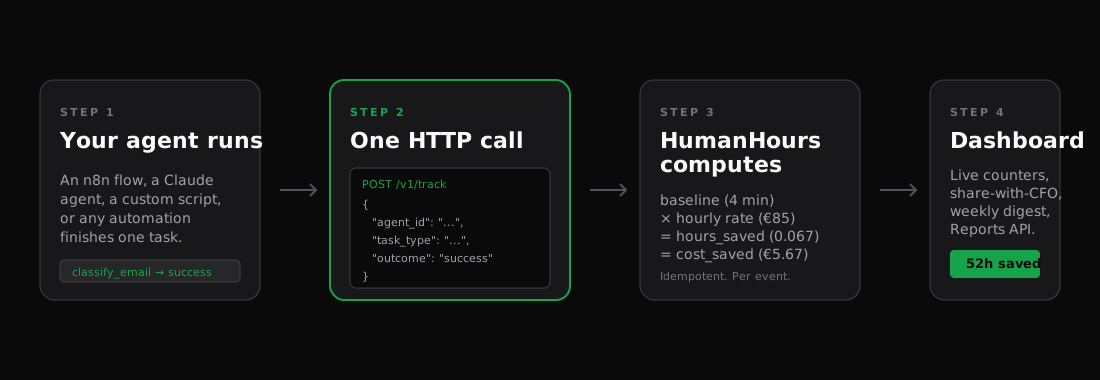
Step 1 · Add the HumanHours node at the end of your flow
Settings → Community Nodes → Install n8n-nodes-humanhours. Once installed, drop the HumanHours node at the end of your existing LinkedIn flow.
Configure the node:
| Field | Value |
|---|---|
| Credential | Create one with your hh_live_… API key. The credential test verifies it for you. |
| Operation | Track Event |
| Agent ID | linkedin-connect (or whatever slug describes the agent) |
| Task Type | linkedin_connection_invite (built-in) |
| Outcome | Success for invites that went out; map to Failure if your "send invite" step errored |
That is everything. The node sends one event per LinkedIn invite, idempotency-keyed off the n8n execution + run + item indexes, so reruns of a failed flow do not double-count.
Step 2 · Verify in the dashboard
Run the flow once. Within seconds the agent appears under /agents (auto-created on first event), and the live counter on /overview ticks up.
Step 3 · Tune the baseline (optional, recommended)
The built-in linkedin_connection_invite task type ships with a 2-minute baseline (research a profile, write a personalized line, send the invite). If your team takes longer in real life, override it on /task-types:
| Field | Value |
|---|---|
| Task type | linkedin_connection_invite |
| Baseline minutes | 5 (or whatever your historical time-tracking shows) |
| Reason | "Includes research + manual personalization step" |
The override applies to all future events in this workspace. Past events keep their original baseline (history is immutable, that is what makes the numbers credible to a CFO).
Step 4 · Verify the math
After a week of running, your dashboard should show something like:
TIME SAVED 7D     COST SAVED 7D     EVENTS
6h 15m            €531              75
Math check: 75 invites × 5 min = 375 min = 6.25h. At €85 / hour = €531.25. The dashboard rounds to €531.
If your numbers are off by a factor (events count is way too high or low), check:
- Is the n8n flow firing more than once per actual invite? Look for retry loops.
- Did you accidentally configure the node before a "filter out" step that drops some items? The HumanHours node fires per item that reaches it.
Going further
- Multiple agents per workspace: if you also run a LinkedIn-message agent, give it
agent_id: linkedin-messageand a differenttask_type. Both show side-by-side on/agents. - Per-client metadata: send
metadata: { client: "Acme" }and the dashboard breakdown groups numbers per client. - Share with the prospect: the share-with-CFO link on
/reportsproduces a public read-only URL with no login required, ideal for the next call where the prospect asks "what does our LinkedIn agent actually do?"
What to read next
- Track a blog pipeline — same pattern with longer per-event baselines (90+ minutes) and richer metadata.
- Read your dashboard — what hours_saved, FTE-equivalent, and net_saved actually mean.
- n8n SDK reference — every parameter on the HumanHours node and how Idempotency-Key is built.